
How to Get WhatsApp Business API in India (2026 Guide)
How to get WhatsApp Business API in India: what you need, Cloud API or a provider, business verification, templates, messaging limits and how Meta charges.
To get the WhatsApp Business API, you need a Meta business portfolio, a phone number that isn't already registered on WhatsApp, and a way to connect: either Meta's own Cloud API set up by a developer, or an official Meta partner (a Business Solution Provider) that gives you a ready-made dashboard. You add the number, get a display name approved, verify your business, and get message templates approved before you can message customers first. Meta reviews each of these separately; there's no single application form.
This guide is for owners and managers of small businesses in Delhi and the rest of India who are outgrowing the free WhatsApp Business app and want to know what the API actually involves before they sign up for anything. Meta now calls it the WhatsApp Business Platform, but most people, and most providers, still say "API".
WhatsApp Business app or API: which do you need?
The free WhatsApp Business app works on one phone (plus a few linked devices) and suits a shop or a consultant who chats with customers by hand. Broadcast lists only reach people who have saved your number, and there's no proper way to plug the app into your website, your CRM or a chatbot.
The API has no app of its own. You use it through software: a provider's web dashboard, a CRM, or something your developer builds. In return you get several team members answering from one number, automated replies, order and appointment messages sent from your own systems, and approved templates you can send to customers who opted in, whether or not they saved your number.
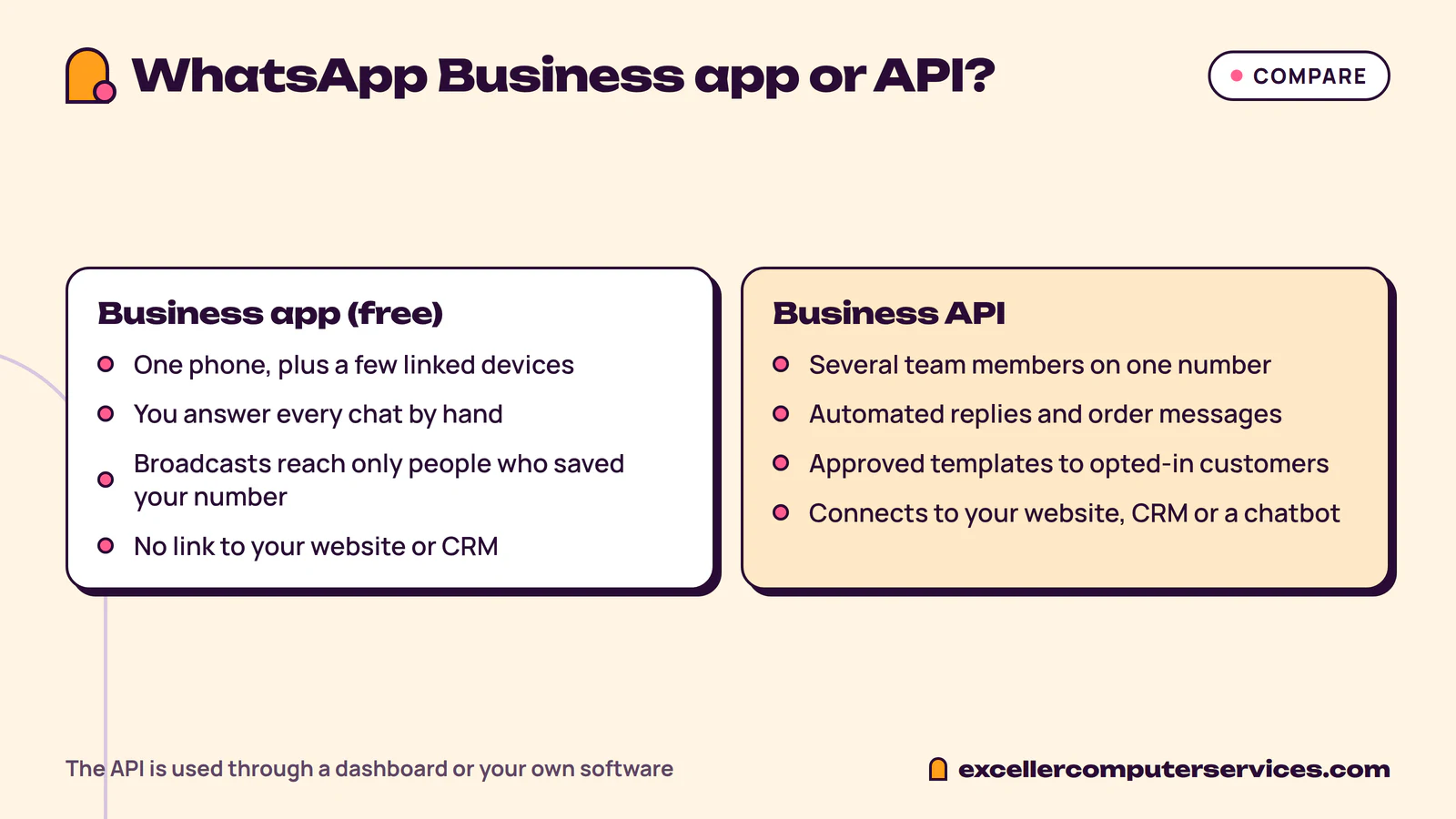
If you send fewer than a handful of messages a day and answer them all yourself, stay on the app. Move to the API when several people need to answer the same number, when you want messages to go out automatically, or when you want to send updates to a list of customers.
What you need before you start
- A Facebook account or a managed Meta account for the person setting it up. This person becomes an admin of the business portfolio, so use the owner or someone senior.
- A Meta business portfolio (what used to be Business Manager) in your business's legal name. If you already run Facebook or Instagram ads, you probably have one.
- A phone number you own that can receive an SMS or a voice call for verification. It must have a country and area code; short codes don't work.
- Business documents for verification, such as your GST certificate, Udyam registration or a utility bill, in the same name and address you enter on Meta.
- A website on your own domain, with the same business name, and ideally a business email on that domain. Meta's reviewers use both to check that you are who you say you are. Our guide to creating a business email ID covers the email part.
- A display name that matches your business, as customers will see it at the top of every chat.
How to get the WhatsApp Business API, step by step
- Create or open your Meta business portfolio, and fill in the legal name, address and website exactly as they appear on your documents.
- Choose how you'll connect: Meta's Cloud API directly, or through a Business Solution Provider (more on this choice below).
- Add your phone number to the WhatsApp Business Account and verify it with the code Meta sends by SMS or call. You'll also set a two-step verification PIN. Keep it somewhere safe.
- Submit your display name. Meta reviews it against its display name rules, and it has to clearly relate to your business.
- Start business verification in the portfolio's settings and upload your documents.
- Write your first message templates and submit them for approval.
- Collect opt-ins from customers, then send your first templates and start answering chats.
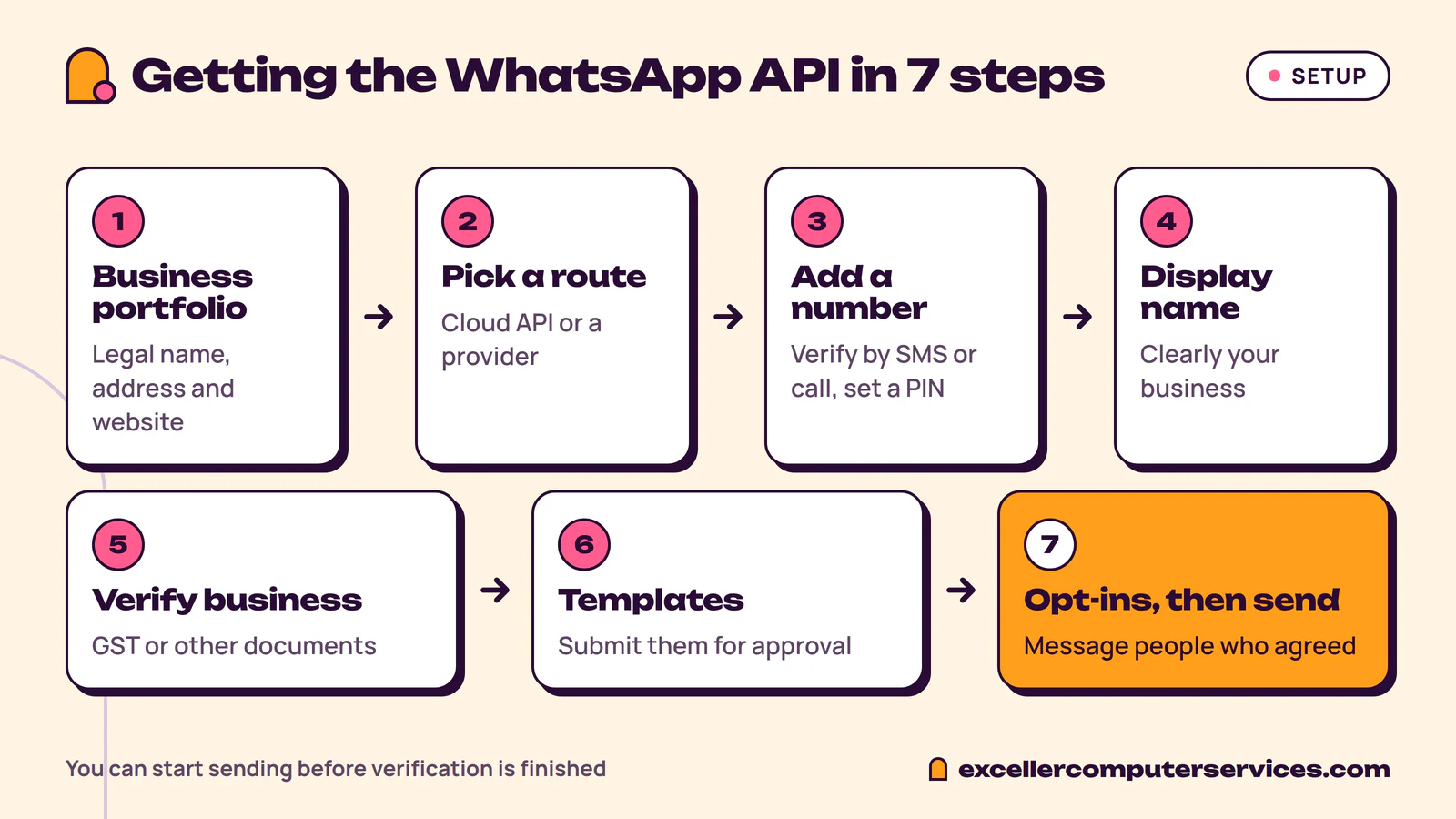
You can begin before verification is finished. The Cloud API setup screen gives you a test number to try things with, and a real number can start sending with the starting limit described further down.
When we set up the WhatsApp Business Platform for a client, we go through an official Meta provider and get the first message templates approved before anything is sent. Before we touch the number, we sit down with the client and decide whether to move their current number or start a separate one for marketing.
Cloud API directly, or through a provider?
Meta hosts the Cloud API itself, and anyone with a developer account can connect to it for free. What you don't get is a screen to read and answer chats. A developer has to connect it to your website, CRM or a chat tool, and someone has to look after that connection. This route suits businesses that already have software of their own or a developer on hand.
A Business Solution Provider (BSP) is a company Meta has approved to sell access to the platform. It does the technical setup and gives you a shared inbox, broadcast tools, chatbot builders and reports. Many providers charge their own monthly fee or a margin on each message, on top of what Meta charges. Before you sign, ask for the provider's fee separately from Meta's charges, and check that the WhatsApp Business Account will be in your own business portfolio, so you can move to another provider later without losing your number.
Most small businesses are better off with a provider, unless they already have a developer who will look after the integration.
Can you use your existing WhatsApp number?
Meta's phone number rules say a number already in use with WhatsApp can't be registered on the API until it is deleted from the app. Deleting the account removes the chat history on that phone, so back it up first and tell regular customers before you switch.
There is an exception for the WhatsApp Business app. Meta has an option it calls coexistence, offered through some partners, that lets a business connect its existing Business app number to the API and keep using the app for one-to-one chats. It has limits, such as no group chat sync, so ask your provider whether your number qualifies and what you'd give up.
If you don't want to risk your main number, use a new one for the API. Plenty of businesses keep their old number for personal chats and suppliers, and put the new one on the website and in their ads.
Templates, opt-in and the 24-hour window
WhatsApp has two kinds of messages. When a customer messages you, a 24-hour customer service window opens, and inside it you can reply freely with ordinary text, photos or documents. Every new message from the customer resets the timer. Outside that window, or to start a conversation, you must use a template that Meta has approved.
Templates fall into three categories: marketing (offers, new arrivals, festive greetings), utility (order confirmations, appointment reminders, payment updates) and authentication (one-time passwords). Meta decides the category when it reviews the template, and it will move a promotional message out of utility if you file it there.
You can only send templates to people who have agreed to hear from your business on WhatsApp. Ask for that consent clearly: a tick box on your enquiry form or checkout, a QR code at the counter, or a click-to-WhatsApp ad where the customer messages you first. Keep a record of when and where each person opted in.
We never send templates to bought or scraped lists. Every contact we message for a client has chosen to hear from the business, through a website sign-up, a checkout opt-in, a QR code at the shop or an enquiry form.
How much does the WhatsApp Business API cost?
Meta doesn't charge to set up the API or to use the Cloud API. It charges for messages. Since 1 July 2025, Meta's pricing page says it charges per delivered message, with a different rate for each template category and for each country the customer is in. Messages customers send you are free. Meta has changed how replies inside the 24-hour window are charged more than once since then, so check the pricing page for the current rules before you plan a campaign.
On top of Meta's charges you pay your provider, if you use one, and for any development work to connect WhatsApp to your systems. That cost varies far more between providers than Meta's own rates do, so compare quotes on the same monthly volume of marketing and utility messages.
Messaging limits: how many customers you can reach
Meta limits how many different customers a business can message first in a moving 24-hour period. Replies inside an open customer service window don't count. According to Meta's messaging limits page, a newly created business portfolio starts at 250 customers a day.
To move up to 2,000, you verify your business, or send 2,000 delivered messages outside service windows within 30 days using templates with a high quality rating. From there the limit rises to 10,000, then 100,000, then unlimited. Meta raises it automatically when your messages keep a good quality rating and you have used at least half of your current limit over the last seven days.
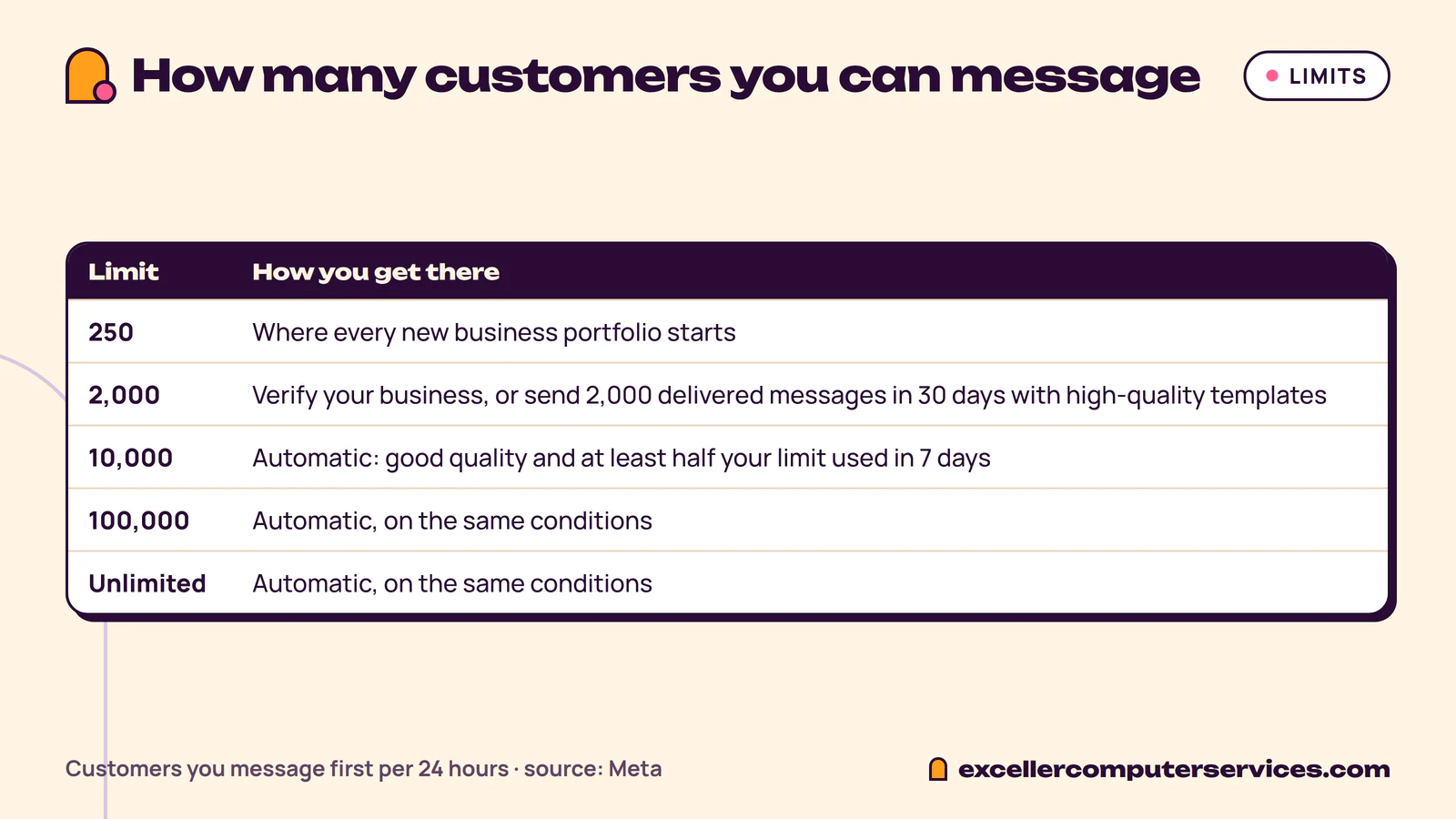
The quality rating comes from how customers react. If many of them block your number or report it as spam, the rating drops, and Meta can hold or lower your limit. Messages that customers asked for, sent at a sensible pace, keep the rating up and let the limit keep rising.
Getting the green tick
The blue or green tick next to a business name is a separate request, an Official Business Account, and Meta doesn't give it to everyone. Meta's official business account page lists the conditions: the business must be verified, the number must have been on the platform for at least 30 days, two-step verification must be on and the display name approved, and the business must follow the messaging policy. If Meta turns a request down, you can apply again after 30 days.
Without the tick, customers still see your approved display name and business profile, so there's no reason to hold back your launch while you wait for it.
Common reasons for delays
- The business name on Meta doesn't match the GST certificate or other documents exactly.
- The website is missing, still under construction, or uses a different business name.
- The display name is a generic word or a keyword ("Best Packers Delhi") instead of the business's own name.
- Templates use vague placeholders, such as a message made almost entirely of variables, or a promotional offer filed as utility.
- The number is still active on a WhatsApp app somewhere.
If you also want an AI assistant to answer common questions on the same number, that's built on top of the API; see our page on AI automation and chatbots. To bring new customers into WhatsApp in the first place, click-to-WhatsApp ads on Facebook and Instagram open a chat and a free customer service window at the same time. We set up the WhatsApp Business Platform for businesses in Delhi and across India as part of our WhatsApp and email marketing service. Every project is quoted on its own; tell us about yours.
Quick answers
How can I get WhatsApp Business API for free?
Meta doesn't charge to connect to its Cloud API, and messages customers send you are free. You pay Meta for the messages you send, and you'll need a developer to connect the Cloud API to your systems, or a provider, which usually charges its own fee.
How long does it take to get WhatsApp Business API approval?
The phone number and the Cloud API test setup can be ready the same day. Display name review, business verification and template approval are separate checks by Meta, and each can take from minutes to several days, longer if documents don't match.
Do I need a GST number for WhatsApp Business API?
Meta's business verification asks for a document that shows your business's legal name and address. A GST certificate is the most common one in India. The verification screen lists the other documents Meta accepts, such as registration certificates or a utility bill in the business's name.
Can I use WhatsApp Business API without a provider?
Yes. Meta's Cloud API can be used directly through a Meta developer account. You don't get an inbox or a dashboard, so a developer has to connect it to your website, CRM or chat software.
Can I use the WhatsApp Business app and the API on the same number?
Normally a number must be removed from the app before it can be registered on the API. Meta's coexistence option, offered through some partners, lets a WhatsApp Business app number connect to the API and keep using the app for one-to-one chats, with some limits.
Want help with this?
Tell us about your business and we will send a free quote.