
How to Create a Business Email ID With Your Own Domain
How to create a business email ID like you@yourbusiness.in: pick a domain and an email provider, add the DNS records, and set up SPF, DKIM and DMARC.

To create a business email ID such as sales@yourbusiness.in, you need three things: a domain name in your business's name, an email provider (Google Workspace, Microsoft 365, Zoho Mail or the mail included with your web hosting), and a few DNS records at your domain registrar that tell the internet where your mail lives. The setup takes an afternoon. Most of that is waiting for DNS changes to take effect.
This guide is for owners and office managers of small businesses in Delhi and the rest of India who are still using a Gmail or Rediffmail address for work and want an address on their own domain. If you already know which provider you want, skip to step 3.
What you need before you start
- A domain name, registered in your business's name, with a login you control.
- Access to the domain's DNS settings. These are usually at the company where you bought the domain, unless someone has moved them to your web host.
- A list of the addresses you want: one per person who needs their own inbox, plus shared ones such as info@ or accounts@.
- A business email address or mobile number for the admin account, so recovery codes don't go to someone who has left.
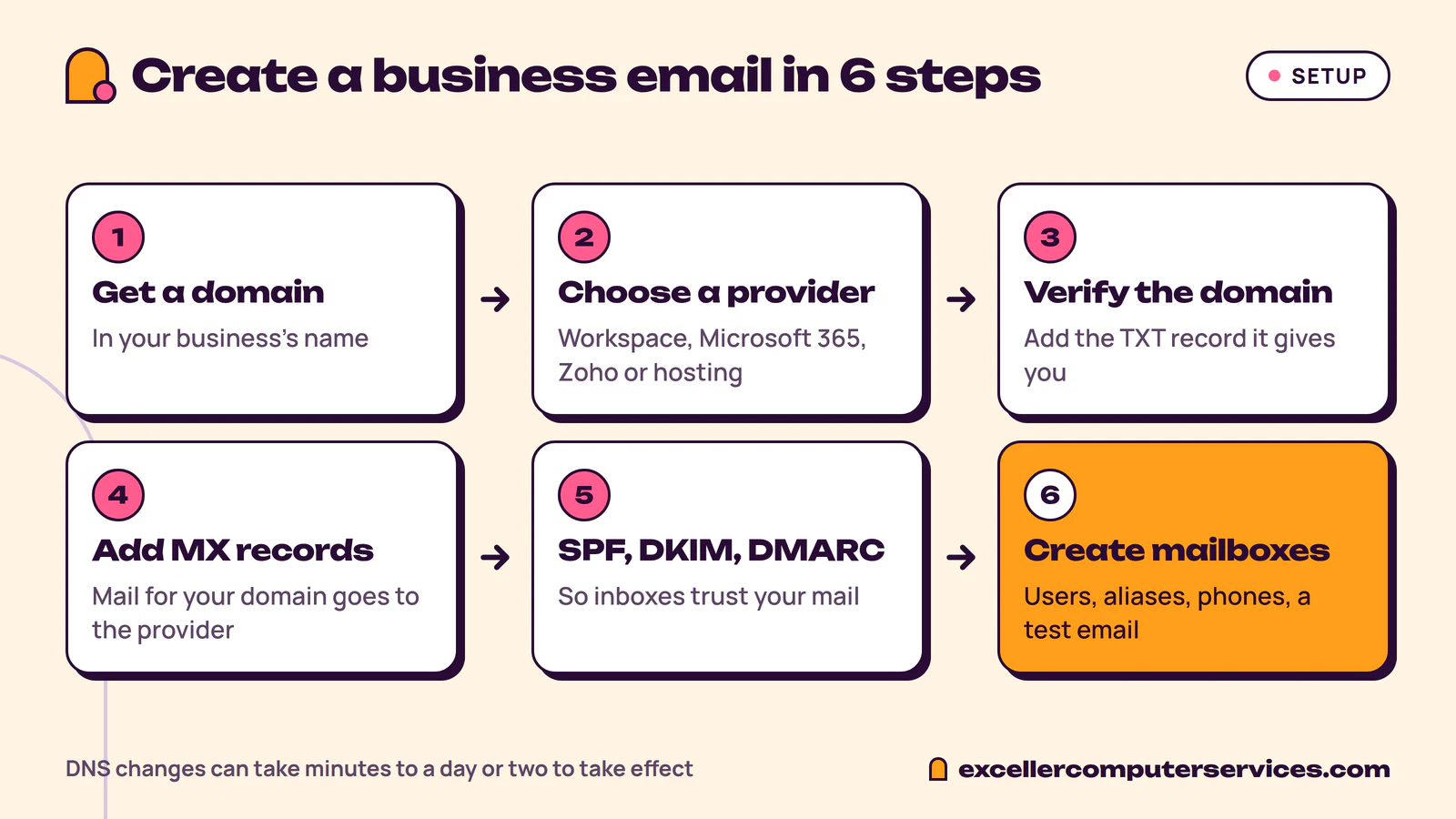
The six steps at a glance
- Register a domain, or get the login for the one you already use for your website.
- Choose an email provider.
- Sign up and prove to the provider that you own the domain.
- Add MX records so mail for your domain reaches the provider.
- Add SPF, DKIM and DMARC records so receiving servers trust mail from you.
- Create the mailboxes and set them up on phones and laptops.
Step 1: Get a domain in your business's name
If you have a website, you already have a domain, and your email can use it. If you don't, register one before anything else. A .in domain tells customers you're in India, and a .com is easier for people abroad to remember. Many businesses buy both and point one at the other.
Register it in the business's name with a business email on the account. Domain renewal reminders go to that address, and when a domain lapses, your website and every email address on it stop working together. Our website maintenance checklist covers the renewals to keep an eye on.
For the websites we build, the domain is registered in the client's business name and they get admin access from day one. The email on that domain stays under their control too, so they never have to ask us before adding an address or moving to another provider.
Step 2: Choose where your email will live
Your domain is the address. The email provider is where the mailboxes sit and what you use to read them. For a small business there are four usual choices.
Google Workspace gives you Gmail with your own domain, along with Google Drive, Calendar and Meet. If your team already knows Gmail, there's almost nothing new to learn. It's paid per user.
Microsoft 365 gives you Outlook with your own domain, and on most business plans the Word and Excel apps too. It suits offices that already work in Office files. It's also paid per user.
Zoho Mail is from Zoho, an Indian company. Its paid plans cost less than the other two, and it has a Forever Free Plan that Zoho describes as "email hosting for one domain for up to 5 users" with 5 GB per user. The free plan doesn't include IMAP or POP, so you read mail in Zoho's own web and mobile apps rather than in Outlook or your phone's mail app. Zoho also says it is available only in select data centres. Check the current plan details before you rely on it.
Email included with web hosting is the mail that comes with many cPanel hosting plans. It costs nothing extra, but storage is often small, spam filtering is basic, and your email shares a server with your website. If the website goes down or the hosting lapses, email goes with it, and moving the website to a new host later means moving the email too.
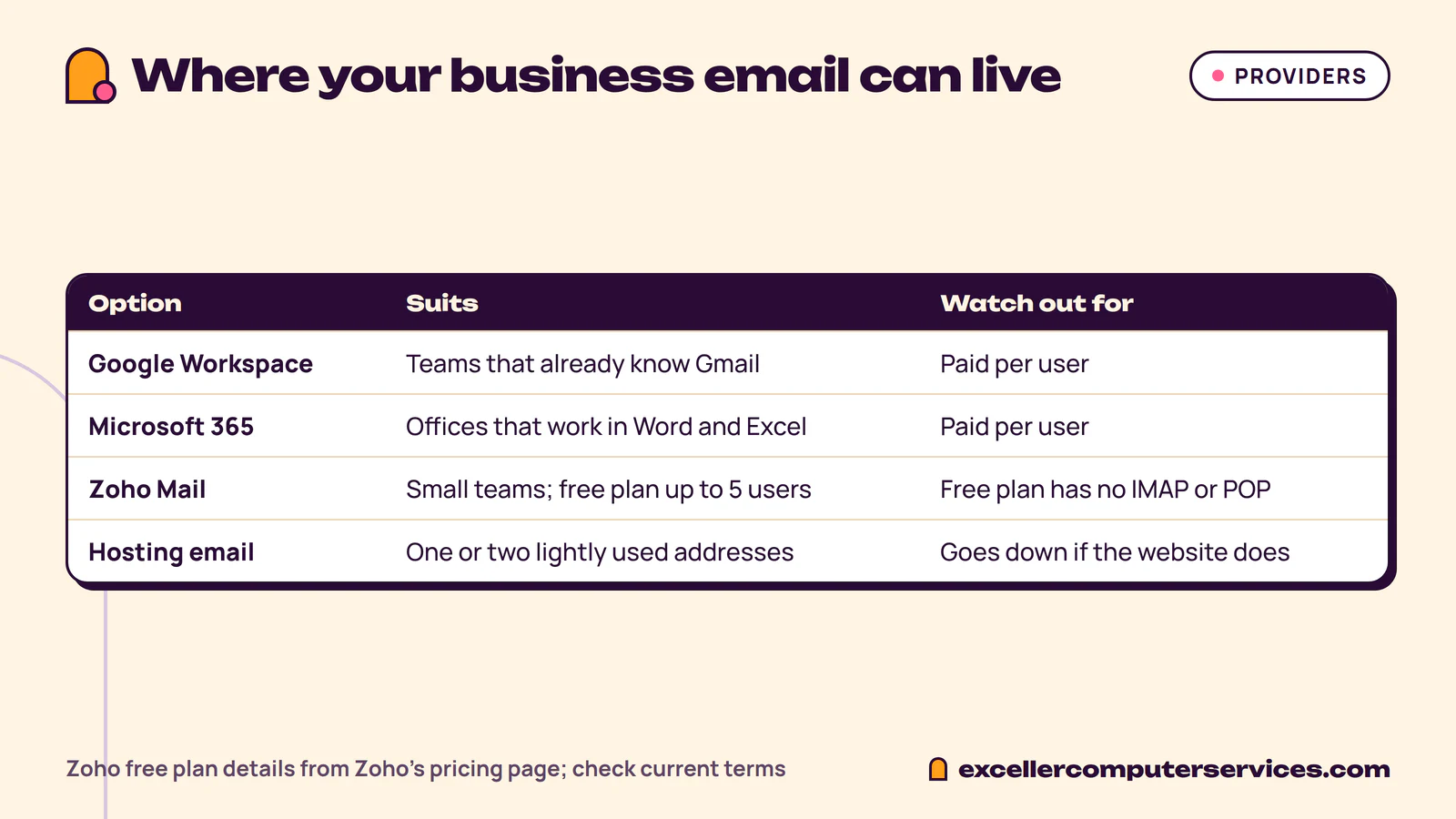
If more than a few people will use email every day, a dedicated provider is worth paying for. Hosting mail is fine for one or two addresses that get light use.
Step 3: Sign up and verify your domain
Sign up with the provider using the domain you want for email. It will ask you to prove you own the domain, usually by adding a TXT record to your DNS. The TXT record is a line of text the provider gives you, such as a google-site-verification code for Google Workspace. Log in to your registrar, open the DNS settings for the domain, add the record exactly as given, then go back to the provider and click verify.
If verification fails, wait an hour and try again. DNS changes can take anything from a few minutes to a day or two to be seen everywhere, depending on the record's TTL setting.
Step 4: Point your MX records at the provider
MX records tell other mail servers where to deliver email for your domain. Until you change them, mail sent to your new address won't reach your new provider.
Delete any old MX records first, unless you're moving from an existing mail system and still need it running until the switch. Then add the ones your provider gives you. For Google Workspace, Google now asks new setups to add a single MX record with the value smtp.google.com and priority 1 (Google's MX record guide). Microsoft 365 and Zoho show their own values in their setup screens.
Be careful if your email currently comes with your hosting. Changing the MX records moves new mail to the new provider, but the old messages stay on the hosting server. Copy them across before you cancel anything. Most providers have an import tool for this.
Step 5: Add SPF, DKIM and DMARC
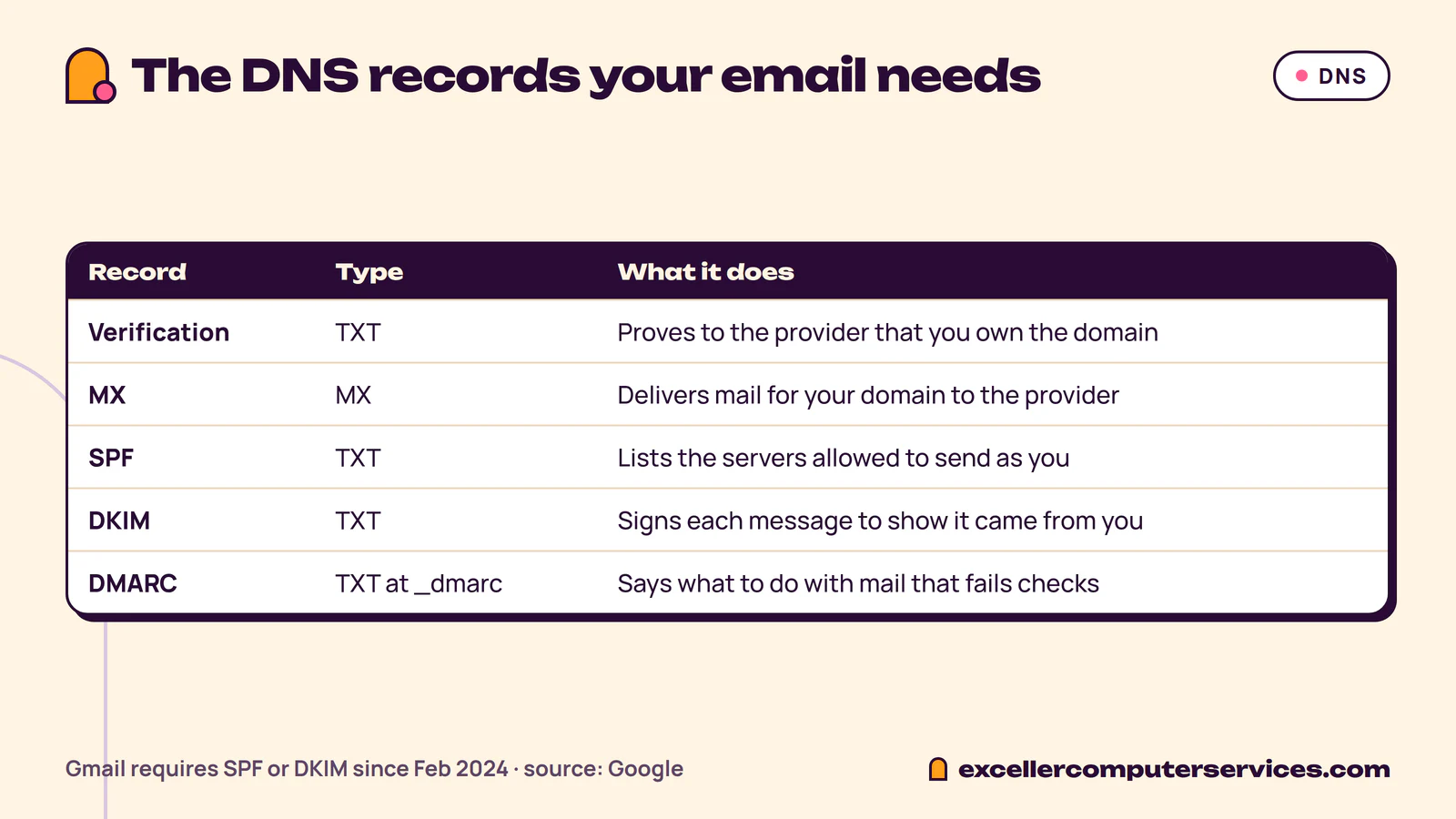
Receiving servers check these three records when they decide whether your mail goes to the inbox or to spam. Google's email sender guidelines have required everyone who sends to Gmail addresses to set up SPF or DKIM since 1 February 2024. Domains sending 5,000 or more messages a day to Gmail also need DMARC. Set up all three even if you send far less, because Gmail and Outlook both check them on ordinary business mail too.
- SPF is a TXT record that lists the servers allowed to send mail for your domain. For Google Workspace it is v=spf1 include:_spf.google.com ~all. A domain can have only one SPF record, so if you also send mail through a newsletter tool or your website's contact form, add them to the same record.
- DKIM adds a signature to each message that proves it came from you and wasn't changed on the way. You generate a key in your provider's admin console, add it to DNS as a TXT record, then switch signing on in the console.
- DMARC tells receiving servers what to do with mail that fails SPF and DKIM, and where to send reports. Start with v=DMARC1; p=none; rua=mailto: followed by an address you check, added as a TXT record at _dmarc.yourbusiness.in. After a few weeks of clean reports you can tighten the policy to quarantine.
If your website's contact form sends enquiries by email, check that it still delivers after you add SPF. A form that sends from your domain through the website's own server can start failing the new SPF record, and the enquiries quietly go to spam.
Step 6: Create mailboxes and set up devices
In the provider's admin console, create a user for each person who needs their own inbox. For shared addresses such as info@ or orders@, you usually don't need a separate paid mailbox. Google Workspace and Microsoft 365 let you add aliases or groups that deliver to one or more existing users, and most other providers have something similar.
Then install the provider's app, or add the account to the phone's mail app, on every device that will use it. Send a test email to a personal Gmail address and a reply back, and check that both arrive outside the spam folder.
Can you create a business email for free?
Yes, with limits. Zoho Mail's free plan covers up to five users on one domain, read through Zoho's apps. Email that comes with your hosting plan costs nothing extra. Google Workspace and Microsoft 365 are paid, though both have offered free trials.
A free Gmail address with your business name in it, such as yourbusiness.delhi@gmail.com, isn't a business email ID, because the address belongs to Google's domain and not to yours. Some people get around this by connecting their own domain to a free Gmail account with the "Send as" feature. Google's help page says Gmail will stop supporting "Send as" for third-party addresses from January 2027, so don't build a new setup around it.
Keep control of the admin account
The admin login for your email is as important as the domain login. Whoever holds it can read, reset or delete every mailbox in the business. Keep it in the owner's name, turn on two-step verification, and when a staff member leaves, suspend their account and forward their mail to someone else instead of deleting it straight away.
When a business moves its website to a new host, the email often moves with it without anyone noticing, because both sat on the old hosting account. Before anyone changes hosting, check where your MX records point and copy the old mailboxes across.
If you're building a new website at the same time, set up email on the same domain from the start. We build business websites on domains registered in the client's name, and for newsletters and customer updates sent from that address, see our WhatsApp and email marketing page. Every project is quoted on its own; to ask about yours, contact us.
Quick answers
How do I create a business email ID with my own domain?
Register a domain in your business's name, sign up with an email provider such as Google Workspace, Microsoft 365 or Zoho Mail, verify the domain with a TXT record, point your MX records at the provider, add SPF, DKIM and DMARC records, then create the mailboxes.
Can I create a business email for free?
Zoho Mail has a free plan for up to five users on one domain, read through Zoho's own apps, and many web hosting plans include email accounts at no extra cost. Google Workspace and Microsoft 365 are paid per user.
Can I use Gmail for my business email?
Yes, through Google Workspace, which gives you Gmail with an address on your own domain. A free @gmail.com address isn't a business email ID, because the address belongs to Google's domain, not yours.
How long does it take to set up business email?
The setup itself takes an hour or two. DNS changes such as MX and TXT records can take from a few minutes to a day or two to take effect, so allow a day before you announce the new address.
Want help with this?
Tell us about your business and we will send a free quote.