
Website Maintenance: What It Includes and a Checklist
Website maintenance keeps a business site online, secure and current: what it includes, a weekly to yearly checklist, and what to ask before paying for a plan.

Website maintenance is the routine work that keeps a site online, secure and correct after launch: renewing the domain and SSL certificate, installing software updates, taking backups, checking that forms still deliver enquiries, and keeping prices, timings and contact details current. Most of these jobs are small. When one is skipped, though, nothing looks wrong from the inside until a customer finds the warning page or the form that never sent.
This guide is for owners and managers of small businesses in Delhi and the rest of India who have a website and aren't sure what needs looking after, or who are weighing up a maintenance plan from an agency (us included).
What website maintenance includes
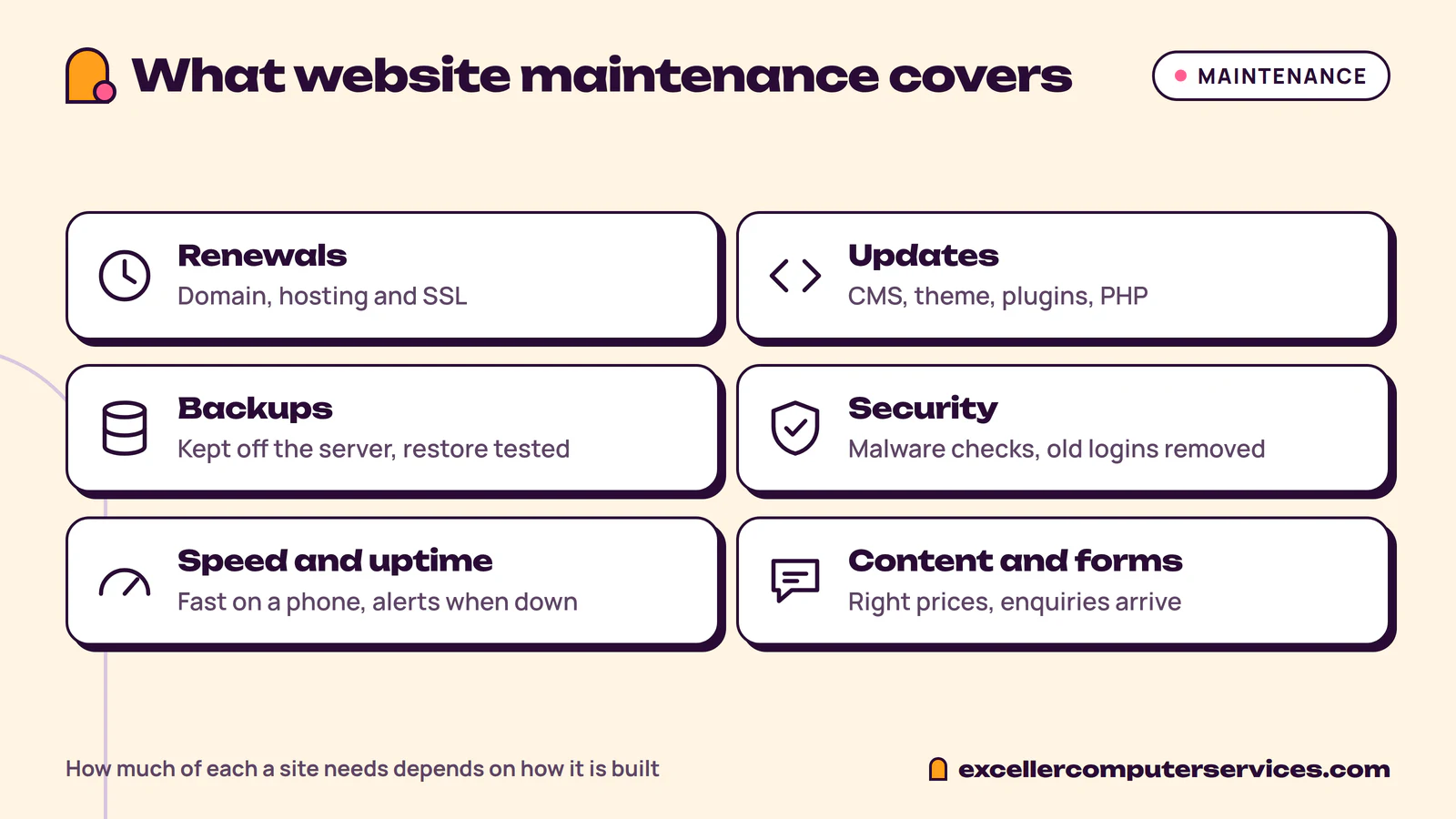
The work falls into six groups. How much of each your site needs depends on how it's built: a WordPress site with a dozen plugins needs far more updating than a simple site with no plugins at all.
- Renewals: the domain name, the hosting plan and the SSL certificate that gives your site its padlock and https address.
- Software updates: the CMS (WordPress, for example), its theme and plugins, and the server software underneath, such as the PHP version.
- Backups: regular copies of the files and the database, stored somewhere other than the server the site runs on.
- Security: watching for malware, spam pages and suspicious logins, and removing admin accounts that people who've left still have.
- Speed and uptime: knowing when the site goes down and keeping pages quick on a phone.
- Content and enquiries: correct prices, timings and offers, and contact forms that still reach your inbox.
The dates that can take your site offline
Three renewals can take a site offline overnight if nobody is watching the dates.
Domain name
When a domain expires, the website and the email on that domain both stop working. For .com and other generic domains, ICANN's Expired Registration Recovery Policy says the registrar must send renewal reminders about a month and a week before expiry. After a domain is deleted, the registry keeps a 30-day redemption period in which you can still get it back. Once that ends, anyone can register it. A .in domain is run by NIXI, India's registry, and follows its own terms, so check your registrar's renewal page for those.
The reminders go to the email address on the domain account. If that's the personal Gmail of a developer who built the site years ago, nobody at your business will see them. Log in to the registrar, check that the domain is in your business's name, put a business email on the account and turn on auto-renewal.
For every site we build, the domain is registered in the client's business name and they get admin access from day one. That way the business can always see its own renewal dates instead of relying on us to remember them.
SSL certificate
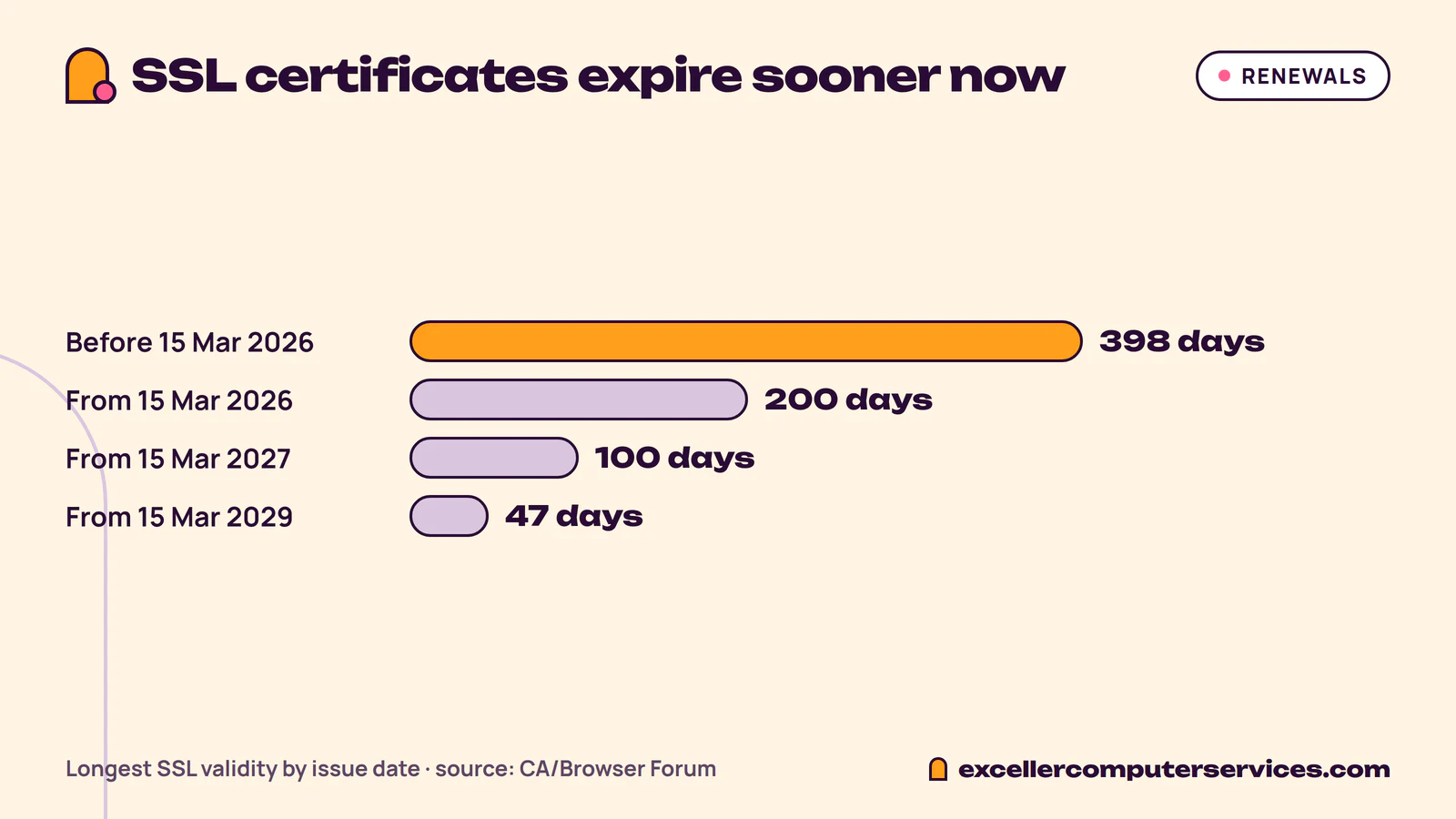
SSL certificates now expire much sooner than they used to. Under a CA/Browser Forum rule, public certificates issued from 15 March 2026 can be valid for at most 200 days, down from 398. The limit falls to 100 days from 15 March 2027 and to 47 days from 15 March 2029 (DigiCert's summary lists the dates). A certificate you renew by hand once a year won't survive this. Make sure your host or your developer renews it automatically, and know who to call if the browser ever shows a "Not secure" warning on your site.
Hosting
Hosting plans renew like domains. If the card on the account has expired or the invoice email goes to nobody, the host suspends the site. Keep hosting in your business's name too, with a renewal date in your calendar.
Updates and backups
Updates close security holes after they've been made public, which is exactly when attackers start looking for sites that haven't installed them. WordPress installs its own minor releases automatically by default, and plugins and themes can be set to update automatically as well (WordPress's guide to automatic updates). Major updates still need someone to check that the site works afterwards, because a plugin that hasn't been updated to match can break a page or the checkout.
Take a backup before every major update, and keep backups on a different server from the site. Once a year, ask whoever looks after the site to restore a backup to a test address and show you that it works.
Sites built without a plugin-based CMS, like the Next.js sites we build, have much less to update. They still need their domain, SSL, hosting, forms and content looked after.
Speed, forms and Google Search Console
Check the contact form yourself once a month: fill it in from your phone and see whether the enquiry arrives. A form can stop sending after a hosting change or an email setting change without any error on the page, and you only find out when enquiries dry up. Do the same with click-to-call and WhatsApp buttons.
For speed, Google's Core Web Vitals give clear targets: the main content should appear within 2.5 seconds (LCP), the page should respond to a tap within 200 milliseconds (INP), and the layout shouldn't jump around while it loads (CLS of 0.1 or less). The thresholds are on web.dev. PageSpeed Insights shows how your pages measure up on a phone.
Google Search Console is free and tells you when Google finds a problem. Its Security issues report flags hacked content, and the Pages report shows pages that have dropped out of Google's index. Add a business email as an owner so these alerts reach someone who'll act on them. If you also work on search rankings, our SEO services page explains what we look at beyond maintenance.
A website maintenance checklist
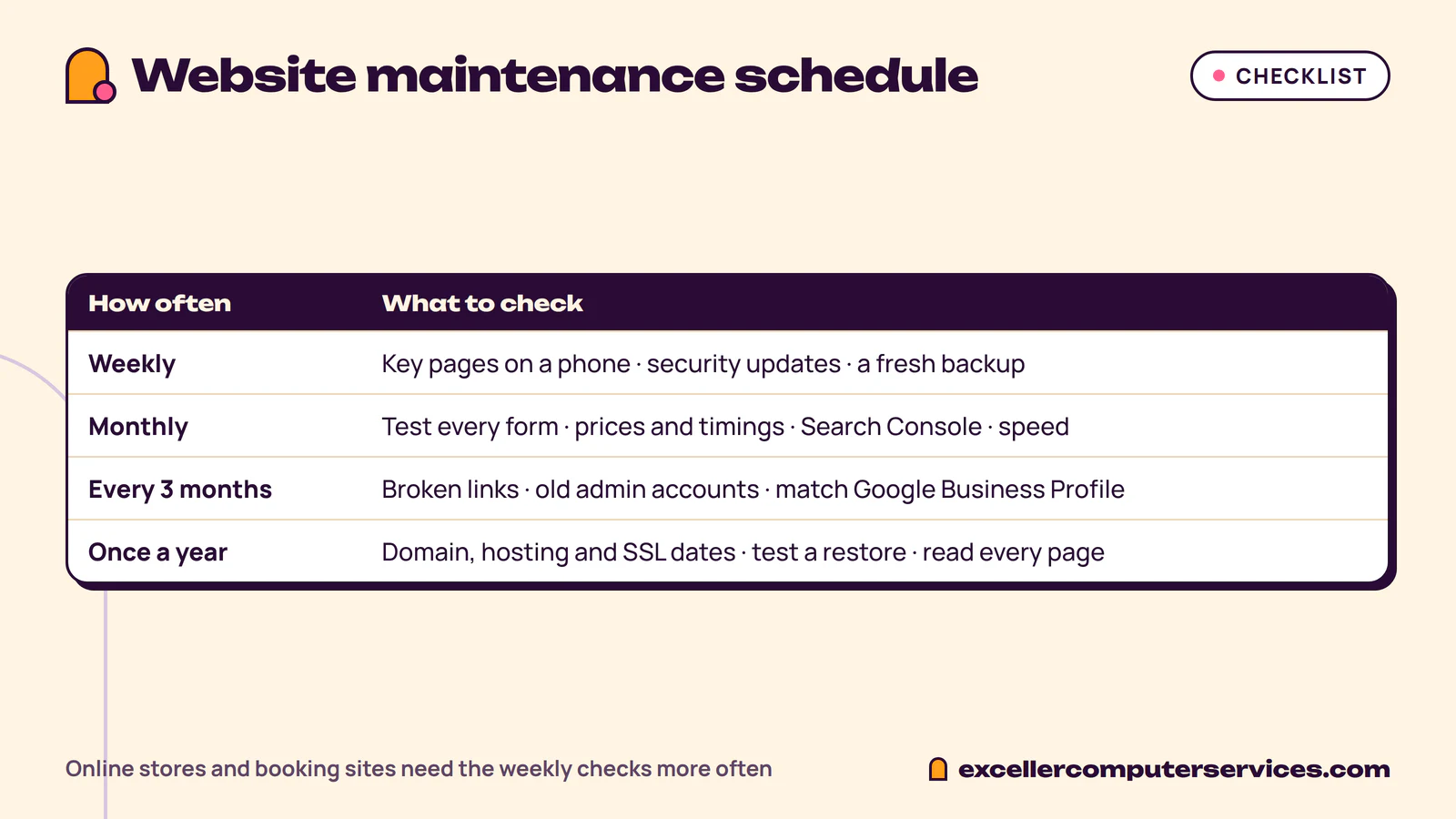
This is a schedule for a typical small business site. An online store or a site with a booking system needs the weekly checks done more often.
Weekly:
- Open the home page and your main service page on a phone.
- Install security updates for the CMS and plugins (WordPress sites).
- Check that a fresh backup exists.
Monthly:
- Send a test enquiry through every form and see that it arrives.
- Check prices, timings, offers and staff names on the site.
- Look at Search Console for security issues and pages dropped from the index.
- Run your main pages through PageSpeed Insights.
Every three months:
- Click through the menu and important links to find broken ones.
- Remove admin accounts for people who no longer work with you.
- Check that your address, phone and hours match your Google Business Profile.
Once a year:
- Check the domain, hosting and SSL renewal dates and who receives the reminders.
- Restore a backup to a test address to prove it works.
- Read every page as a customer would and update anything that's out of date.
If your address or hours change, update your Google Business Profile on the same day as the website, so customers don't see two different answers.
Should you do it yourself or pay someone?
Some of the checklist needs no technical skill. Anyone in the business can test the forms, read the pages for old prices and keep an eye on renewal dates. Updates, backups, restores and cleaning up a hacked site are different: a wrong step can take the site down, so they're better done by the developer who knows how it's built.
A split that works for many small businesses: the owner or an office manager handles content and the monthly form test, and the developer or agency handles updates, backups and renewals.
For sites we build, care after launch covers updates, backups, SSL, security checks and small changes, handled by the same people who built the site. Clients send us changes by email and we make them, so nobody on their team has to touch the code.
What to ask before you sign a maintenance plan
Maintenance plans vary a lot, and a monthly fee tells you little about what's actually done. Before you agree to one, ask:
- Exactly which tasks are included, and how often each is done.
- How fast they respond if the site goes down, and whether that includes Sundays and holidays.
- Where backups are stored, how often they're taken, and when a restore was last tested.
- Whose name the domain, hosting and SSL are in, and whose card pays for renewals.
- How many small content changes are included each month.
- Whether you get a short report of what was done.
- What happens to your logins and files if you stop the plan.
Whoever maintains the site, the domain, hosting account and admin logins should be in your business's name. Then you can move to someone else without asking anyone's permission.
We look after the sites we build as part of our website design and development work, and we can take on sites built by someone else. Every project is quoted on its own. For an online store, our e-commerce development page covers what we set up. To ask about your site, contact us.
Quick answers
What does website maintenance include?
Renewing the domain, hosting and SSL certificate, installing CMS and plugin updates, taking and testing backups, checking for malware, keeping pages fast, testing contact forms, and updating prices, timings and other content.
How often should a website be maintained?
Check security updates and backups weekly, test forms and review content monthly, check links and user accounts every three months, and review renewal dates and test a backup restore once a year. Online stores need the weekly checks more often.
Is website maintenance necessary for a small business?
Yes, if the website brings in enquiries. An expired domain or SSL certificate, an outdated plugin or a broken contact form can stop enquiries without any warning to you, and customers usually notice before the owner does.
Can I maintain my website myself?
You can handle content updates, form tests and renewal dates yourself. Software updates, backups, restores and fixing a hacked site are safer with the developer who built the site, because a wrong step can take it offline.
Want help with this?
Tell us about your business and we will send a free quote.